

Client start times
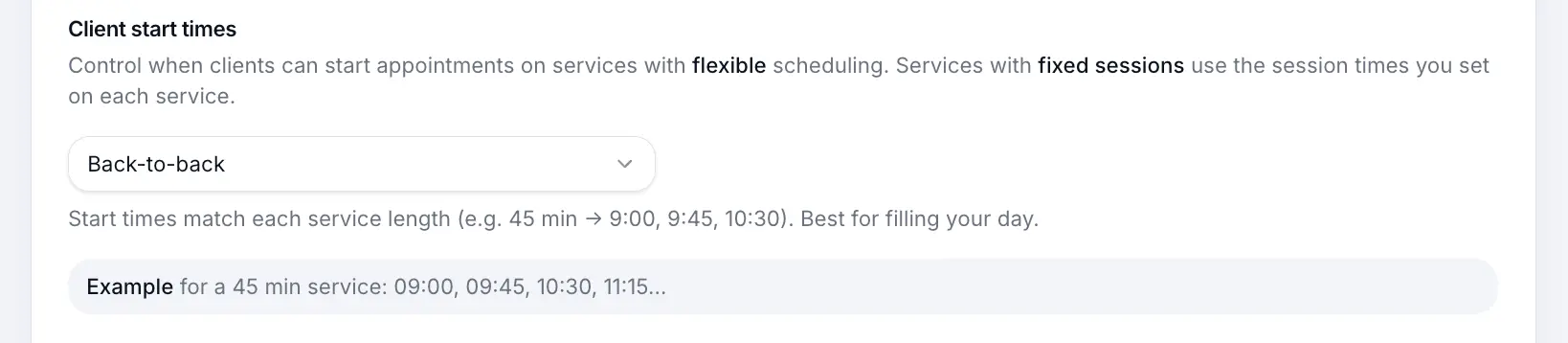
Control the slot grid interval for flexible services — e.g. every 15, 30, or 60 minutes.
Quick answer: Client start times set how often bookable slots appear for flexible services — e.g. every 30 minutes or aligned to service duration.
Overview
For flexible services, customers pick from a grid of start times throughout your open hours. Client start times control how that grid is spaced — tighter intervals offer more choice; wider intervals simplify your calendar.
Step-by-step
Open Scheduling settings
Look for: Scheduling
Choose a slot interval
Select an interval or use service duration alignment. A preview shows example start times.
Look for: Client start times
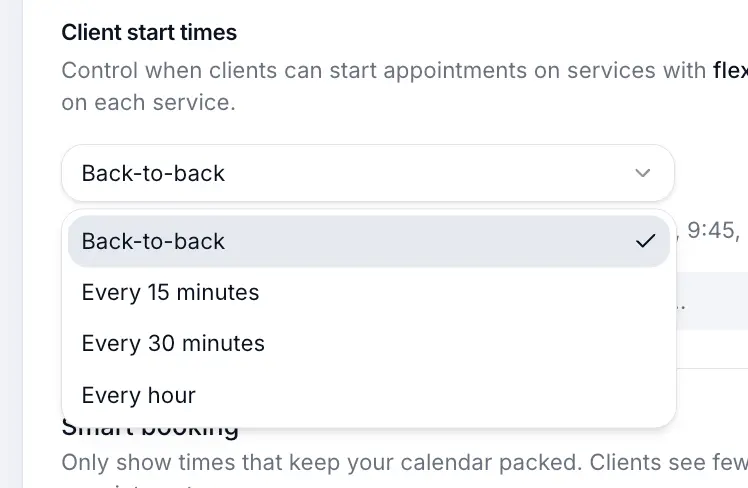
Preview shows how slots will appear to customers. Save start times
Save sits under this section and stores only the start-time interval.
Look for: Save
What happens next
Flexible services on your booking page show slots at the chosen interval within business hours.
Flexible scheduling servicesRead →Common questions
Frequently asked questions
No. Fixed sessions use times you set per weekday on each service.
Related articles
Services
Flexible scheduling services
Create a 1:1 service where customers pick any available time during your business hours.
Settings
Setting business hours
Set which days you're open and your daily opening times for customer bookings.
Settings
Smart booking
Pack your calendar by hiding start times that would leave awkward gaps.
Still need help?
If this article didn't answer your question, search the help centre or contact our support team.
Sign in to open a tracked support ticket, or use the contact form.